Some Time you Have A Pdf File but you want to edit and modify then probably if you are using Adobe Reader then you can't, However if you are using Foxit Reader then you can edit the Pdf file. However you can't all the in an efficiently way. You Need A converter which you give Pdf file and they Give you Word File. then you can customise and you can do what you want. Pdf Files are mostly use to just as Read only and not to edit like Ms word in which you can do. one thing other i want to mention here. if you has installed Ms Office 2010 or 2011, 2012. Then you can Converter you pdf files to word files without using a Software.
How to Do it with MS word 2011+: when you write you desired text or anything. just click on the office save button and then when a pop window occur then select to Save as pdf file and then chose location where you want to Save The File and Done you file will be Pdf. Now just open to See PdF file
What you Have to do?
Download the Sofware Extract with WinRaR if Required and install.
Meta Tags are very important and usually the blogger;s owners ignore it. adding meta tags to blogger help you to let's know search engines about your site contents efficiently.
After adding meta tags you will see after a few weeks your site traffic increased.
one thing i want to mention here that Do not rename meta tags again and again, especially more than 3 times. otherwise Google may ignore your blog. so make sure when adding that to put such Description and Keywords that is accurate for your blog, so that you don't need to change it.
Meta Tags are very Good for Seo For blog. because in the Blogger settings you don't have option to add it directly you have to go to template and then HTML.
How to Add Meta Tags in Blogger:
1. Go you Blog template click edit HTML.
2. Find this Code <b:include data='blog' name='all-head-content'/>
Look at the screen shot where to put meta tags in blogger.
3. Copy The below meta Tags code and paste after it.
<meta content=' You Blog Description Here' name='description'/> <meta content=' Blog Keywords Here Separated by commas ' name='keywords'/> <meta content='Anther Name Here' name='author'/>
4. in the above code in the description meta tag put your blog description.
and in the keywords meta tag put your keywords. and author meta tag put your name.
Done!
Enjoy
Watch Video How to implement it
If you have any problem or any suggestions/Feedback comment here.
Register Make A Free Domain For Blogspot or For Wordpress or For A Website
In the previsous tutorials we learnt how to create a blog, Now in this tutorial we will learn how to register a free domain for blog like .Tk . you can also register another free domain for blog which will come soon in the next tutorials.There are 2 methods to register a Tk domain for your blog, the first is very usefull and very good, but the other is very bad if you want to see your blog successful in future. make sure to understand, Why ? you will find your answer at the below of the post.
The Method-1 to Register a free Tk domain for your blog is as follows.
This method just forword your Tk url to your blog address
3.Add a domian, and check free domain. Click on Next.
4.Put Your refer Url(Your Blog address). And click Next.
5.Done! Now your blog can be visited by That Tk address.And also by Blog address Enjoy
.If you have any problem then comment. Video Tutorial will be published Soon!! So keep Visiting
i recommend for my Blogger friends to use just the above method and do not use the below custom domain.
Register A custom Tk domain for Your Blog
Before Your proceed to get a custom domain for your blog, please give attention here.
If you want a successful blog with traffic for your blog,
My advice as a brother as a freind that do not use custom domain, why because Google does not give importance to Tk in Google search results. You can use the first above method which is good, and is just forword your Tk url to your Blog address.
IF you want Tk domain for just personal use and dont want traffic then you can use custom domain
Method of to get custom domain is same as a above but. you have to Use DNS setting for your blog. 1. when you Add a domain so click on that domain and click on Modify
2.and then see the screen shot above and do like that. Pro4pak.tk is a domain. and seeting as Click on add new and your domain name without www. and insert at the front 216.239.32.21 Now add Cname Record and insert www.yourdomain.Tk and at the front putghs.google.com Done! It will take 30 minuts for changes to be modified. Thanks!
Comments are More welcome! Tell your Blogger friends also about this post and use the below social sites and share it. Thanks for your support!
Thesis blogger template is desigened and customized according to the owners of bloggers , all errors or bugs are resolved. Features: Stylish 2 columns, one is post body and second one is sidebar, where you can put many widgets and Ads. In the bottom of this template, there is 3 rows as well.
This template consists of Read More hack with automatic thumbnail to make the template more professional.
Readers can easily comment on any post by clicking Add your comment button which consists on Home Page. Also, you can view, how many comments consists in each posts.
It has 2 navigation bar on the top of the template where you can add the main link to your blogs post or categories.
Footer:
Page navigation on the bottom of each page.
Want To Say Thanks! Please use the below social sites(facebook,google+..) and share this post with your friends! Thanks to You!
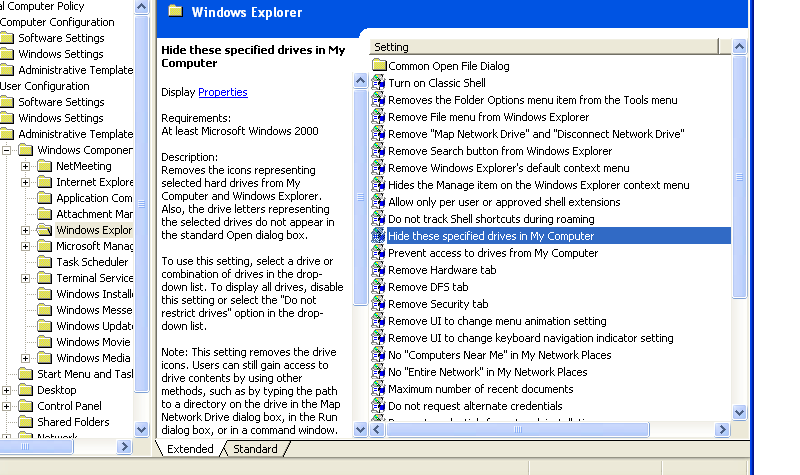
If you want to hide your hide your Hard Disk So you Can because some time you want to protect Your files or your personal data to be safe and be private. or you have some drive and you dont want that some one else see it. in this today tutorial i will show you how to hide pc Drives which includes HardDisk Drives,that is C or D, and CD/DvD Drives T The method is below: 1. Open Run from Start menu 2. type gpedit.msc and click OK 3. Click on Administrative Templates Then Windows components then Windows explorer then "Hide these specific drive in my computer"
4. A window will pop up Click On Enable Now select Any which Drive you want to hide.
If you don't want to hide Then Click Disable and press OK.
Takken TaG Tournament Game The Big Game: Reveiw With Extreme Graphics Takken Tag Tournament PC game is the most Big Game. It is a shooting game most widely used by Game lovers to play this game. usually this game available in the market . and peoples play it by paying to it. You can play it on the pc. first you have to download the game then install the game. it is full version and the setup is full. download link is of mediafire. so it is easy to download the game. and hopefuly you will like this game. what's new in takken tag tournament pc game: if you ever play the first series of takken game then it is next for you. if you like this game so another version will also be realesed next time so be ready to get challenge.
You can play this game as a single player or multi player. however if you want to play this game mulitplayer so i recommend to play it with joysticks so it is fun and easy to enjoy. and if you want to play single player so you can also play it and can enjoy yourself.
The Story of Takken Tag Game Begins with: After the conclusion of The King of Iron Fist Tournament 4, an intense battle between father and son, Kazuya and Jin, took place at Honmaru in the Mishima Zaibatsu headquarters. Jin emerged as the victor and Heihachi turned his back on Kazuya.
How To Play Takken Tag game: First Download the Game the download link is below and of mediafire so when download complete open the copressed file if required extract the folder and then click on the .exe file. so then you can ready to play the game by clicking that exe file which is Takken Tag.exe. > You don't need to install this game. it is direct play game. Enjoy
System Requirement for Takken Tag Tournament Game are below: Processor= 1.0GHz RAM= 256MB Graphics= 32MB
Like This Game? Share it with friends! Thanks to you!
This is a cool facebook trick............You can also impress your fb friends now.
Simply type the like the above code that corresponds to the appropriate rage face into Facebook chat, and the image of the face you chose will appear, emoticon-like in its existence.hm Facebook didn’t suddenly become hip to the Internet and add face emoticons (something from which Google Chat will befits really).
user daychilde explains that these aren’t actually some form of ragemotions, but that the double bracket and code corresponds to a user profile or page, and when put into Facebook chat, will show the thumbnail of the profile/page that the code links to the corresponds.
Here’s a tidy list of some more rage face codes: Simply copy the corresponded code and paste in facebook chat and hit enter. and the image will appear.
Troll face: [[171108522930776]]
Not bad Obama: [[169919399735055]]
Me Gusta:[[211782832186415]]
LOL Face: [[168456309878025]]
NO Guy: [[167359756658519]]
Yao Ming: [[218595638164996]]
Derp: [[224812970902314]]
Derpina: [[192644604154319]]
Forever Alone:[[177903015598419]]
Not Bad: [[NotBaad]]
Challenge accepted: [[100002727365206]]
Okay face: [[100002752520227]]
Poker face:[[129627277060203]]
Okay face: [[224812970902314]]
Socially awkward penguin: [[98438140742]]
Lamp:[[100001256102462]]
No [[167359756658519]]:
MOG: [[142670085793927]]
Feel like a sir: [[168040846586189]]
Like This post? Take your 3 seconds and share it with your friends by using below social sites. Thanks to you!