Wednesday, September 12, 2012

Submit Blog to 50 Search engines Directories


Blog is a voice to Sprread world wide
If you Have a Blog and want to spread it accross the wolrd wide internet you should use and you must to use to submit blog to free search engines directories. No html needed to put on your blog. on the some you have to put html on your blog.
Below i given the most top high page Rank Directories to submit your blog on it.
the effect of visitors you will get within 2-3 Weeks . so don't be confused after submitting . it will take time.
The best directories are given in this post to submit your blog.
Beyond submitting to directories:  
blog is in drictries

Your Post in Google Search Results
You know how Google index your site and how it appear your post result when some one search.
Google check your links in others sites too. so if you submit to search engines and directories so your blog will have links there and Google know it. so your post result have more chances to be apperad in Search Results.
One thing More when you submit your Blog with search engines directories your blog seo will enhance and will grow up . and will continue untill your Blog exists.
Below are the free directories to submit your Blog on it.
What You Have To Do: 
Go to the below High page Rank sites, and click on "submit" or "add URL" and submit yours.


1.Google          2.Bing                  3.Open Directory                4.ASR  

5.ScrubTheWeb        6.ExactSeek        7.Anoox          8.FyberSearch

9.SearchSight           10.Amfibi     11.Web World           12.A1WebDirectory

13.Link Centre    14.SoMuch          15.Info Tiger          16.SecretSELabs

17.SonicRun          18.MasterMOZ           19.Wikidweb       20.GigaBlast

21.Submit        22.BusinessSeek         23.oneMission   24.SurfSafely

25.GhetoSearch    26.IS     27.IllumiRate       28.The Living Link


29.Elite Sites Directory       30.Polypat       31.Finest 4

32.Skoobe       33.RDirectory       34.The Great Directory        35.Synergy Directory

36.Directory Free        37.Online Society     38.24/7 Web Directory

39.OneMillionDirectory          40.Link1 Directory       41.TXT Links

42.1WebsDirectory       43.What U Seek       44.All Business Directory

45.Wondex       46.Nexus Directory       47.9Sites

48.Cipinet        49.Info Listings           50.DirectoryFire

>>Click Here to submit your Blog with Us, and Get Free Back Link


After submitting your Blog to all above Free directories you will see the traffic effect within 2-3 Weeks.
Your Comment are most welcome!
Like this post?
Share it with your friends.

Tuesday, September 11, 2012

Free Social Networks Promotion

Social icons collection
Free Social Media Promotion:
Increase Your Facebook Page Likes, YouTube subscribers, Google+ Circles, Twitter Followers, Pinterest Followers and others.

If you have Website or Blog and you want to promote Your business or Providing Services to more users, then social media is a Great Factor to do it
In the start of your business it is difficult to promote, and you need support and contribution of users, and you can get these contribution by social sites.
The method i am teaching today to increase Facebook fans,promote twitter to increase your followers , and Google plus circles, +1s is the legal way and Safe and checked by Me. I hope you will enjoy and will like.
Social sites to promote Your business and services


Increase Facebook Page Likes,Your subscribers,Twitter followers,Google pluss, Circles and much more:
The Method is as Follows:
Step-1.First Go To This Site http://addm.co/?R8LZCND
Step-2: Register: Create Your account. After Filling the form a confirmation email you will receive so confirm(go to your inbox and in the email click on confirm)
Step-3.Now Login to The Site.
Step-4.First Click on Add Site/Page. Here you can add your Facebook Page URL, Google+ id URL,twitter URL id and more. So add your own.
Step-5. Now at the left side There are social sites so click on your  desired site to increase. and like page,add to circles and in the return the more you will like and add the more your page fans will increase.
In fact your Page likes will increase more than you like other pages.
It was the example of Facebook Page.
Others social sites like Google plus circles increasing, twitter followers method is the same as Facebook page.

Comments are most welcome. If you have any question or any problem then comment!
Thank you!


Tuesday, September 4, 2012

Pdf to Word Converter Full Version Free Download

Pdf2word conveter
PDF To Word Conversion:
 Some Time you Have A Pdf File but you want to edit and modify then probably if you are using Adobe Reader then you can't, However if you are using Foxit Reader then you can edit the Pdf file. However you can't all the in an efficiently way.
You Need A converter which you give  Pdf file and they Give you Word File. then you can customise and you can do what you want.
Pdf Files are mostly use to just as Read only and not to edit like Ms word in which you can do.
one thing other i want to mention here. if you has installed Ms Office 2010 or 2011, 2012.
Then you can Converter you pdf files to word files without using a Software.

How to Do it with MS word 2011+:
when you write you desired text or anything. just click on the office save button and then when a pop window occur then select to Save as pdf file and then chose location where you want to Save The File and Done you file will be Pdf. Now just open to See PdF file
Pdf to word Converter Tools


What you Have to do?
Download the Sofware Extract with WinRaR if Required and install.
then After installing you can do You work.

Pdf to word converter free download

Tuesday, August 28, 2012

Best method to add meta tags in blogger

Google and Meta Tags

Meta Tags And Blogger:
Meta Tags are very important and usually the blogger;s owners ignore it. adding meta tags to blogger help you to let's know search engines about your site contents efficiently.
After adding meta tags you will see after a few weeks your site traffic increased.
one thing i want to mention here that Do not rename meta tags again and again, especially more than 3 times. otherwise Google may ignore your blog. so make sure when adding that to put such Description and Keywords that is accurate for your blog, so that you don't need to change it.
Seo and meta tags in blogger

Meta Tags are very Good for Seo For blog. because in the Blogger settings you don't have option to add it directly you have to go to template and then HTML.

How to Add Meta Tags in Blogger:
1. Go you Blog template click edit HTML.
2. Find this Code  <b:include data='blog' name='all-head-content'/>
best method to add meta tags in blogger
Look at the screen shot where to put meta tags in blogger. 

3. Copy The below meta Tags code and paste after it.

<meta content=' You Blog Description Here' name='description'/>
<meta content=' Blog Keywords Here Separated by commas  ' name='keywords'/>
<meta content='Anther Name Here' name='author'/>


4. in the above code in the description meta tag put your blog description.
and in the keywords meta tag put your keywords. and author meta tag put your name.

Done!
Enjoy
                                                     Watch Video How to implement it 
If you have any problem or any suggestions/Feedback comment here.
Thanks to You!


Tuesday, August 21, 2012

How to register Free Tk domain for blogspot or Wordpress

Register Make A Free Domain For Blogspot or For Wordpress or For A Website
In the previsous tutorials we learnt how to create a blog, Now in this tutorial we will learn how to register a free domain for blog like .Tk . you can also register another free domain for blog which will come soon in the next tutorials.There are 2 methods to register a Tk domain for your blog, the first is very usefull and very good, but the other is very bad if you want to see your blog successful in future. make sure to understand, Why ? you will find your answer at the below of the post.
The Method-1 to Register a free Tk domain for your blog is as follows.
This method just forword your Tk url to your blog address
1.Go to Dot.Tk
you can check a domain availablity there.
2.Sign Up(fill the form). Click Here To sign Up
3.Add a domian, and check free domain. Click on Next.
4.Put Your refer Url(Your Blog address). And click Next.
5.Done! Now your blog can be visited by That Tk address.And also by Blog address Enjoy
.If you have any problem then comment. Video Tutorial will be published Soon!! So keep Visiting
i recommend for my Blogger friends to use just the above method and do not use the below custom domain.


Register A custom Tk domain for Your Blog
Before Your proceed to get a custom domain for your blog, please give attention here.
If you want a successful blog with traffic for your blog,
My advice as a brother as a freind that  do not use custom domain, why because Google does not give importance to Tk in Google search results. You can use the first above method which is good, and is just forword your Tk url to your Blog address.
IF you want Tk  domain for just personal use and dont want traffic then you can use custom domain

Method of to get custom domain is same as a above but. you have to Use DNS setting for your blog.
1. when you Add a domain so click on that domain and click on Modify

2.and then see the screen shot above and do like that.
Pro4pak.tk is a domain. and seeting as
Click on add new and your domain name without www.
and insert at the front 216.239.32.21
Now add Cname Record and insert www.yourdomain.Tk and at the front put ghs.google.com
Done! It will take 30 minuts for changes to be modified.
Thanks! 


Comments are More welcome! Tell your Blogger friends also about this post and use the below social sites and share it. Thanks for your support!


Sunday, August 19, 2012

Customized Thesis Blogger Template Free For you

Thesis blogger template is desigened and customized according to the owners of  bloggers , all errors or bugs are resolved.
Features:
Stylish 2 columns, one is post body and second one is sidebar, where you can put many widgets and Ads. In the bottom of this template, there is 3 rows as well.

 This template consists of Read More hack with automatic thumbnail to make the template more professional.
Readers can easily comment on any post by clicking Add your comment button which consists on Home Page. Also, you can view, how many comments consists in each posts.


It has 2 navigation bar on the top of the template where you can add the main link to your blogs post or categories.
Footer:


 Page navigation on the bottom of each page.
                                       
Want To Say Thanks!
Please use the below social sites(facebook,google+..) and share this post with your friends!
Thanks to You!

Friday, August 17, 2012

How To Hide Hard Disk Drive C , D Or CD/DvD Drive in WIndows Xp and Vista

How to hide Hard Disk Drive:windows Xp or Vista
If you want to hide your hide your Hard Disk So you Can because some time you want to protect Your files or your personal data to be safe and be private. or you have some drive and you dont want that some one else see it.
in this today tutorial i will show you how to hide pc Drives which includes HardDisk Drives,that is C or D, and CD/DvD Drives
T
The method is below:
1. Open Run from Start menu
2. type gpedit.msc and click OK
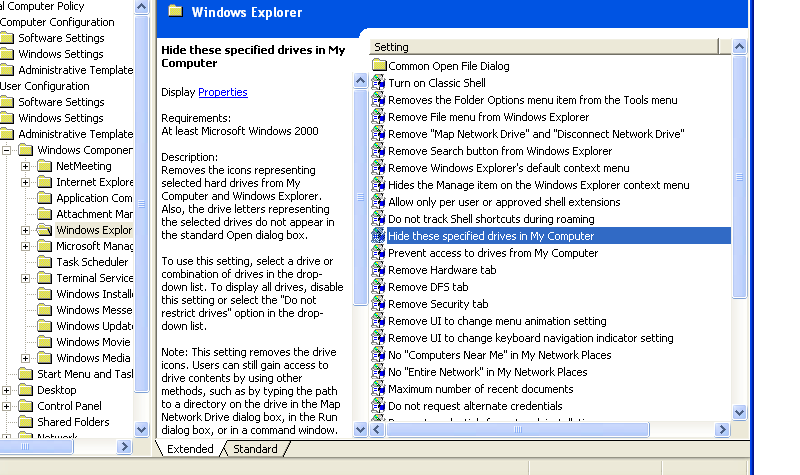
3. Click on Administrative Templates Then Windows components then Windows explorer then "Hide these specific drive in my computer"
Hide Drive C or D or CD DVD Drive
4. A window will pop up Click On Enable Now select Any which Drive you want to hide.
How To Hide Computer Drives
If you don't want to hide Then Click Disable and press OK.
Enjoy!
if have any problem then comment.
Thanks!
Or Watch Video Tutorial: