Sunday, April 29, 2012

Awesome Seo Trick For Blogger Enhance Seo Performance

Searching for a post that  your blog have:
when some one search for some things so the results come. But
By default Blogger displays the blog title first, followed by the name of the post.
it's important for the name of the post to come before the name of your blog, especially when it comes to google search results.
so there will be more chances for your blog traffics.
why to change it?
It's very important to have the Post Title + Blog Title arranged accordingly because this is how you would want your blog to be displayed on google's search results. This way more people will click on your link when searching google because the post title is more relevant than your post name.
screen shot that how google display the blog results.


 How to change it, so first the post will display followed by blog name.

1.Go to Layout>edit HTML in your Blogger dashboard.
2.Search for this tag: <title><data:blog.pageTitle/></title>
3.Replace this tag with the following code:

<b:if cond='data:blog.pageType == &quot;index&quot;'> <title><data:blog.title/></title> <b:else/> <title><data:blog.pageName/> | <data:blog.title/></title> </b:if>

4.Save your template

5.It may take a few days for the changes to show up on the google search results. I guarantee you that you will start receiving more traffic from google once you are re-indexed!

Still dont understand?
Watch video How to do it.

like this post? really? share it with your friends.
Thanks to you!   Have a suggestion or problem comment!


Friday, April 27, 2012

Best way to submit sitemap to Google and Bing

Best Method and way to Submit sitemap to Google And Bing using webmaster Tools:
Submit sitemap to Google and Bing so they will know about your content and posts, so whenever some one search on Google or on Bing so if your blog have the result. so more visiters to your blog.
In the previous  post we learnt that how to verify blog to Google webmaster Tools.
now we will learn how to submit sitemap to Google and bing efficiently,you can also test sitemap before submitting.
If  you'r Blog or site is hit by Google Panda algorithm then it would help you to recover it By resubmitting sitemap.
Submiting a sitemap helps search engines Crawl and index contents,
Now how to submit sitemaps:

How To Submit sitemap to Google:
  1. Go to Google webmaster Tools
  2. Login to your account
  3. Click on your blog name
  4. Click on Optimization at the Left side and Then click  Sitemap.
  5. There you will see a Submit a Sitemap button click on it
  6. And type the following and click on Submit Sitemap button
/atom.xml?redirect=false&start-index=1&max-results=500
7.Done!
Now your post and pages will indexed to Google, it may take a few minuts to be indexed.


Submiting to Bing:
Note: in previous  post  we learned that how to verify blog to Bing.


1.you must have a windows live id.
2. Go To Bing webmaster tools
3.click on your blog, and then click on crawl and then click on submit sitemap.
and paste the following code.
/atom.xml?redirect=false&start-index=1&max-results=500
4.Done!
Now your post and pages will indexed to Bing, it may take a few minuts to be indexed.

Thursday, April 26, 2012

facebook funny trick

Facebook funny hacking trick.

you can edit every words of facebook homepage.insterting facebook hacking trick,
this is a funny trick. using javascript code you can also do it.
How to do it?
1.Go to facebook homePage.
2.Copy and Past the below code.
javascript: document.body.contentEditable = 'true'; document.designMode = 'on'; void 0


3.Hit enter and enjoy.
Screen Shot:
Watch video


About Hacking facebook account:
Is this possible to hack facebook account?
yeah, it is possible but extremely difficult.
it is just impossible to hack facebook account from sever.
because facebook has strong privacy and security and it is impossible to hack.
to hack facebook account first you have to hack facebook severs, and you know it is not of that kind of navie users(simple developers) works,
However it is possible to hack it from client , means from the user.
for this you have to the advance knowldge of php,asp.net and all other stuffs,
and you will have a different idea.so you can implement it.
After a few months i will create some tutorials about web programming and web designing in urdu language step by steps..if you are interested so stay with me..
i will post tutorials on Google Plus.  my Google Plus profile .
Make sure to add me.
Thank you!


Lock Folder Without Software Protect Your Files Guaranteed

Lock folder without software
Lock Folder without installing Software Trick: 
Protect your files without installing a software for it.Some time you need to hide your files but now a days everyone know how to view hidden files in windows.This post(tutorial) will explain you how to lock and hide your files that cannot be accessed by someone else. it will need password to view the files.
Your Privacy guaranteed and you don't need to worry for your files.You can apply this method to all versions of windows including windows Xp/vista/7/8.

How To Lock and Hide Folder? : Follow Below steps
Step1.
Copy the below code and paste it in notepade, save this file Lock.bat

Hiding locking folder
Step 2:

  1. Run this file(click on the file) and type Y and hit enter.
  2. So a  locker folder will created automatically(copy your files to that folder).Now again run the file and type password 123456789, the folder will disappears and locked.
  3. To unlock the folder again run the file and enter your password 123456789

Note: You can change the password just replace 123456789 with your own password in the file.

                                       Watch video How to do it(Youtube)  

Have you any questions? Feel Free to comment

Tuesday, April 24, 2012

Verify blog to Google and Bing to access Webmaster Tools

Verify your blog to Google and Bing so then you can access their webmaster tools, you can manage             sitemaps, sitelinks and other that we will learn in upcoming posts.
   Best practice to use webmaster tools so you can interact with google and bing and let they know about your content means posts.
Verify to Google.


1.you must have Gmail account.
2. Go To Google webmaster Tools
3. sign in.
4. so a list of your blog will you see.
5.Now click on a blog and and verify.
6.choose the verification method of meta tag.
7. copy the code and paste the meta tag code in your html section after <head>.
8. And click verify.
Done!

Verify to Bing:


1.you must have a windows live id.
2. Go To Bing webmaster tools
Same method as verifying to Google.

Watch video How to do it.

Friday, April 20, 2012

Cadillacs and Dinosaurs PC Game Full Setup Free Download


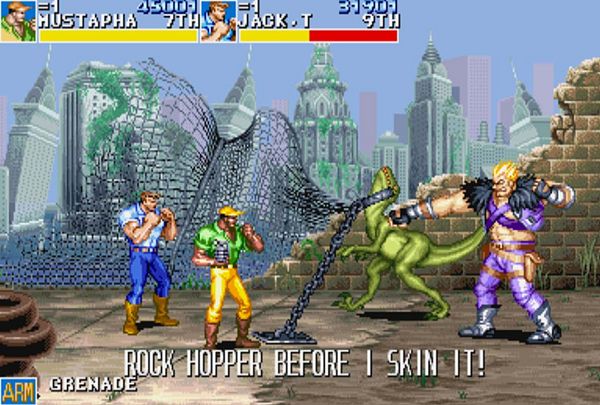
Cadillacs and Dinosaurs:Arcade Game (known in Japan as Cadillacs Kyouryuu Shin Seiki) is a 1992 arcade game released by Capcom. The game-play is like that of many other side-scrolling beat’em up games of the time, such as Streets of Rage or Final Fight. A distinctive feature of this game is the frequent use of firearms, rarely seen on other games of its kind, which normally favored weapons such as bottles and knives.  It is difficult to keep the car intact for long, because the boss at the end of the sequence (Hogg) is armed with grenades.
this game is widly used in shops...where people and usually students paly in video game shops.
for this game peoples pay some money .and for some time they can play this game. untill they lose the game.
when you download the game so it is the setup of file.
first you have to extract the folder.
this game is very nice.
Cadillacs and Dinosaurs Characters
Jack Tenrec 
Hannah Dundee
Mustapha Cairo 
Mess O’Bradovich
The story begins:
Cadillacs and Dinosaurs Stage bosses
Vice Terhune (Vice T.) – the boss of City In The Sea (Level 1)
The Butcher – the boss of Swamp Forest (Level 2)
Hogg – the boss of Hell Road (Level 3)
Slice – the boss of Jack’s Garage (Level 4)
Morgan / Morgue – the boss of Village Of Flame (Level 5)
Tyrog – the boss of Jungle and Mine (Level 6)
Slisaurs – the bosses of The Vault (Level 7), they are “reptilian clones” of Slice (Level 4 Boss)
Dr. Simon Fessenden – the boss of Deep Deep Down (Level 8)
Game play instructions:
Start Game and Press “5” and then “1”
“CTRL” and “ALT” For Jump and kick
Enjoy. You can Play This Game Easily After you fond the buttons.


Wednesday, April 18, 2012

Send Free SmSs from pc to mobile


Send Unlimited international SmSs free
You can send free sms as much as you want.
Unlimited free international SmSs.
The best thing is that smss delivered within 2 or 3 seconds.
if you like this awesome post then please spread it to your friends.
How to send sms?
1.Type your massage.
2.write Receiver mobile number with country code.
     for example 00923001234567.
3.Click on Send and then Send SmS Now.
You are done...sms will be delivered in 2 or 3 seconds.
Thanks!